Connect Claude Code to TweakThis
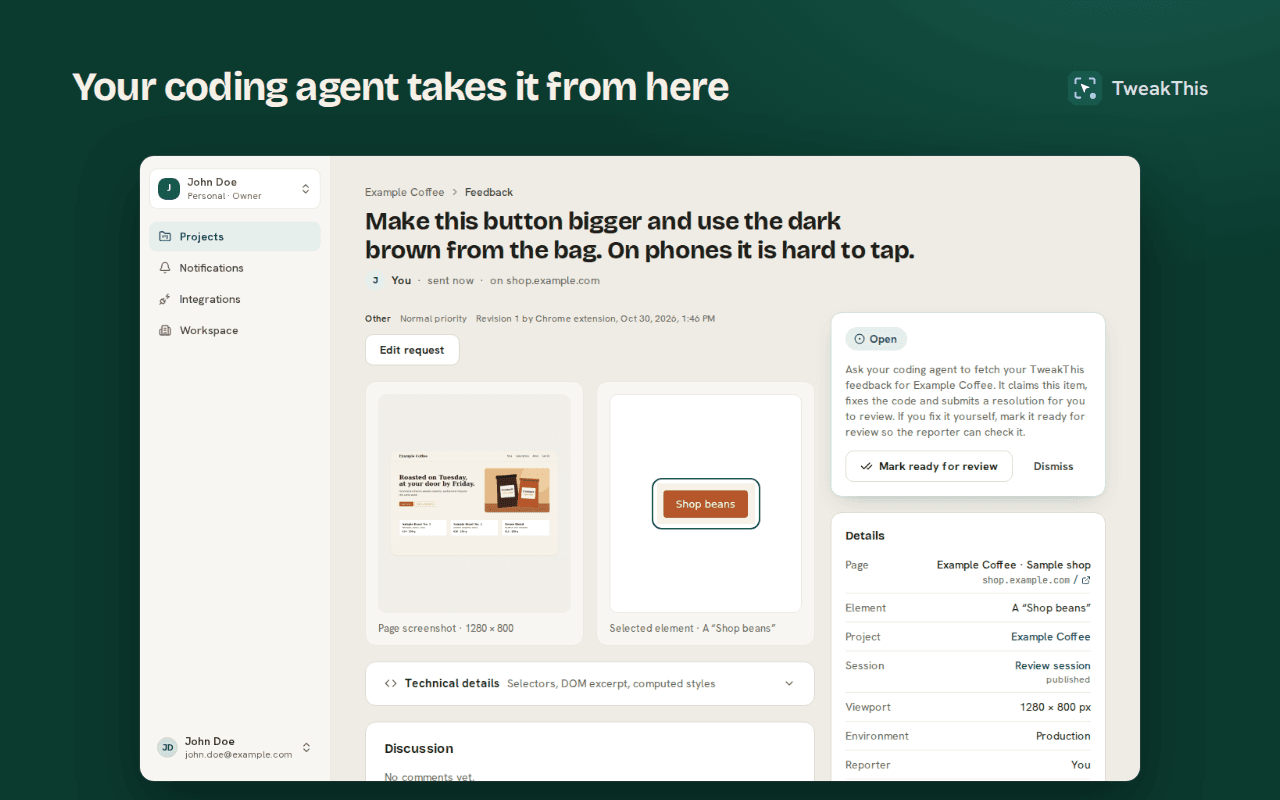
Claude Code fetches the feedback your clients, or you, leave on a website, fixes it in your repository and reports back, through the TweakThis MCP server. Setup takes a few minutes.
Guide · Last updated 2026-10-28
What you need
- A TweakThis account with a project for the site, and a URL rule for each address it runs on (local, preview, production).
- The TweakThis extension in Chrome or Firefox on desktop, signed in.
- Claude Code, run in the site’s repository.
1. Add the TweakThis MCP server
Run this in your project’s folder:
claude mcp add --transport http --client-id a8ded99a-8371-4488-8b63-ffa170c933a9 --callback-port 38501 tweakthis https://tweakthis.io/mcp2. Sign in
In Claude Code, run /mcp, choose tweakthis and then Authenticate. Or from a terminal:
claude mcp login tweakthisYour browser opens TweakThis: choose the workspaces and projects Claude Code may use, and allow. There is no token to copy or store. Running Claude Code on another machine over SSH? The browser returns to port 38501 on your own computer, so forward it first (ssh -L 38501:localhost:38501 you@host), then add --no-browser and open the printed link locally.
Prefer a personal access token? Create one under Integrations → Access tokens in the dashboard and add the server with it instead:
claude mcp add --transport http tweakthis https://tweakthis.io/mcp --header "Authorization: Bearer <token>"Ask Claude Code to work through the feedback
Each project page in the dashboard has a prompt to copy, with the project’s ID filled in, so the agent never has to guess the project from its name. It reads like this:
Use the TweakThis MCP server to work through feedback on the project "<project name>" (project ID <project-id>).
Only use this project ID; never choose a project by its name. Before editing, check that you are working in the repository <owner/repo>; if you are not, stop and ask me.

1. Call list_feedback with project_id "<project-id>" and status "open".
2. For each item, call get_feedback and use the note, expected and actual result, screenshot, selectors and page context to find the element in the code.
3. Make the change. If something is unclear, ask with add_comment instead of guessing.
4. Call submit_resolution with a short summary of what you changed and how you checked it. I review and accept it in the dashboard.
To work on one batch only, publish it as a review session and copy the prompt from the session page instead; it carries the session’s ID as well.
What Claude Code receives with each item
- The note in the reporter’s words, and the expected and actual result when given.
- The page URL and title, the viewport size and the device pixel ratio.
- The element or region: several selector candidates, a short excerpt of its HTML, its attributes and a few computed styles.
- A screenshot of the page and a crop of the element, with anything the reporter redacted blacked out.
Form input values are never read. Captured page data reaches the agent as evidence from the page, not as instructions to follow.
What happens next
- The agent claims the item, so a second agent or a teammate does not work on it at the same time.
- If the request is unclear, it asks one question. The item waits in needs input until you or the client answer in the dashboard.
- It fixes the code and submits a resolution: what it changed and how it checked it. The item moves to ready for review.
- The client, or you, accepts the fix or reopens the item with a note. Only a person can accept or dismiss an item; the agent cannot.
The tools
| Tool | What it does | Changes data |
|---|---|---|
list_projects | The projects you granted it, with each one’s repository hint. | No |
list_feedback | Items in a project or a review session, most recently updated first. | No |
get_feedback | One item: the note, expected and actual result, page and element context. | No |
get_attachment | A screenshot or element crop, as an image the agent can look at. | No |
claim_feedback | Claims the item for 15 minutes, renewable, so no other agent works on it. | Yes |
release_feedback | Gives the item back when the agent stops. | Yes |
add_comment | Progress, or a question that sets the item to needs input. | Yes |
submit_resolution | What it changed and how it checked, with links: ready for review. | Yes |
Any other agent that speaks MCP over Streamable HTTP can use the same tools with a personal access token; the MCP server page has the details. Questions? See the FAQ or pricing.
Using Codex as well? See Connect Codex to TweakThis.